Introducing lfpga: a package manager for FPGA development
Every other corner of software has a package manager. Python has pip, Rust has cargo, JavaScript has npm. You type one command, a dependency and everything it needs lands in your project, pinned and reproducible. FPGA engineers have had nothing like it. We reuse IP by copying files between projects, wiring up git submodules by hand, or pasting a module from a repo we hope still builds. It works, but it is 2005-era workflow in a 2026 world.
So we built the missing piece:
$ pip install lfpga
$ lfpga add picorv32
$ lfpga install
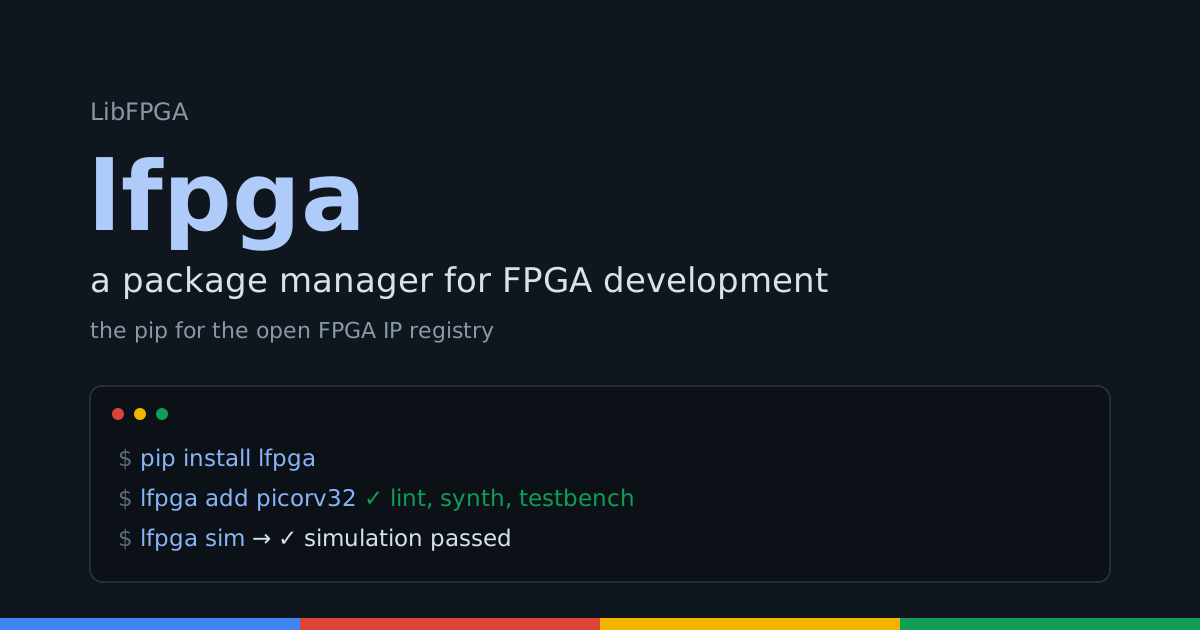
lfpga resolves an FPGA IP core and everything it depends on, pins exact
commits, assembles a source list your simulator or synthesizer consumes,
and can run the build for you. It is open source, it is on PyPI today, and
it is backed by the LibFPGA core registry: a curated, verified
directory of open cores. The registry is the pypi. lfpga is the pip.
New here? The lfpga project page is the living reference: every command with live output, the manifest and lockfile format, the full command table, and how to contribute. This post is the story behind it.
Why a package manager for FPGA is genuinely different
You cannot just clone npm and swap the file extensions. Hardware breaks almost every assumption software package managers lean on, and getting those differences right is the whole game.
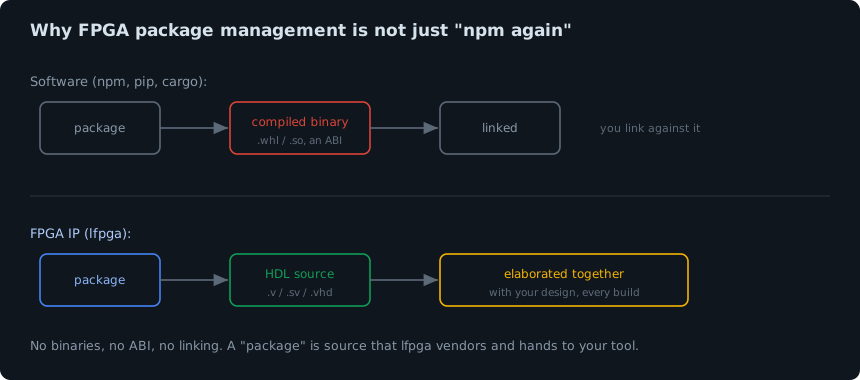
The big one: there is no binary and no linking. A Python wheel is a
compiled artifact with a stable interface you link against. An FPGA "core"
is HDL source that gets elaborated together with your design on every
build. The right mental model is header-only C++ or vendored source, not a
linked library. So lfpga fetches source and hands it to your tool, it
never produces a binary.
The second: there is no universal build. Verilog and VHDL are consumed
by a dozen different tools (Verilator, Icarus, Questa for simulation, Yosys,
Vivado, Quartus for synthesis), each with its own file-list format. A
package manager has to produce the inputs those tools expect, not replace
them. lfpga emits a plain filelist that works everywhere, and can drive
the open tools directly.
And a few more that shape the design: parameterization rather than an ABI
is how HDL composes, Verilog has a single global module namespace so name
collisions are a real hazard, and vendor primitives tie some cores to
specific devices. lfpga is built around these realities rather than
pretending they are not there.
The novel part: packages proven to build
Here is the thing no other FPGA tool can offer. When you lfpga add a core,
it can carry an earned verification badge.
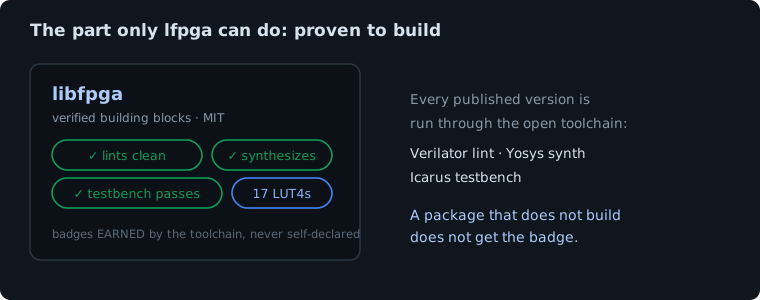
Every listing in the registry can be run through an open toolchain that lints it with Verilator, synthesizes it with Yosys, and runs its testbench with Icarus. A core that passes earns badges (lints clean, synthesizes, testbench passes) and real resource numbers (LUTs, flip-flops). Crucially, those badges are earned by the toolchain, never self-declared. A package that does not build does not get the badge.
That means lfpga can tell you, before you clone a single line, whether a
dependency actually builds. "npm for FPGA, where the packages are proven to
work" is a genuinely new thing, and it exists because the registry runs the
checks.
How it works
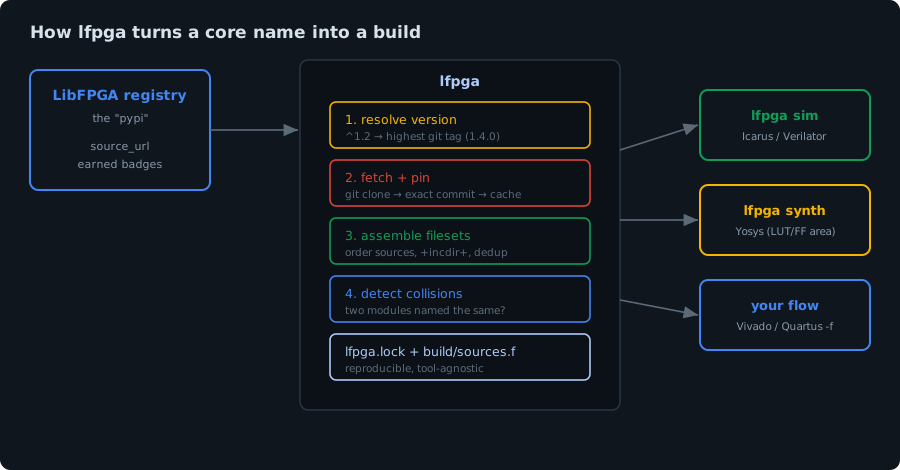
The pipeline is small on purpose. lfpga asks the registry for a core's
source repository, resolves a version range against that repo's git tags,
fetches and pins the exact commit into a local cache, reads the repo's own
manifest to know which files are the synthesizable sources, checks for
module-name collisions across everything it pulled, and writes two things: a
lockfile that pins it all for reproducibility, and a build/sources.f
filelist. From there it either hands the filelist to your flow or runs the
build itself.
A five-minute tour
Here is the whole loop in action: add a verified core, install it, and simulate it, in three commands.

Let us walk through it with real output. First, install and start a project:
$ pip install lfpga
$ lfpga init my-soc
Created libfpga.yaml for 'my-soc'.
Add a core. lfpga looks it up in the registry and shows you what you are
getting, badges and all:
$ lfpga add libfpga
Found libfpga: https://github.com/libfpga/libfpga
  license MIT · verilog · ✓ lint, synth, testbench, formal
Added 'libfpga' to libfpga.yaml. Run `lfpga install`.
Install resolves everything, pins it, and assembles the sources:
$ lfpga install
Resolving 1 dependencies...

  libfpga    v0.5.0   a4ef4a3fa4  1 files  ✓ lint, synth, testbench, formal

Wrote lfpga.lock and build/sources.f (1 source files).
Your libfpga.yaml is the manifest (like Cargo.toml, it both declares your
dependencies and, if you publish, describes your own core):
name: my-soc
dependencies:
  libfpga: "*"
And lfpga.lock pins the exact commit and the exact build sources, so the
build is identical on your machine, your colleague's, and your CI, this year
and next:
[[package]]
name = "libfpga"
version = "v0.5.0"
rev = "a4ef4a3fa4ac1de6aa485baf3efc56f14a6df704"
files = ["rtl/math/lfpga_crc.v"]
verified = ["formal", "lint", "synth", "testbench"]
Version ranges, resolved against real tags
You do not have to pin by hand. Ask for a range and lfpga picks the
highest matching tag the core actually published:
$ lfpga add serv@^1.2
$ lfpga install
  serv   1.4.0   7d9cde4e6c  18 files  unverified
^1.2 resolved to 1.4.0 because that is the newest 1.x tag on the SERV
repo. Carets, tildes, 1.x wildcards, comparators and exact versions all
work. And if nothing matches, you get a clear error, not a mystery:
$ lfpga install
lfpga: no version of 'serv' matches '^9.0'. Available: 1.2.1, 1.3.0, 1.4.0, v1.0
It builds, not just fetches
This is where lfpga stops being a fetcher and becomes a build tool. Point
it at a testbench and it runs the simulation. Here is a real project that
depends on libfpga and drives its CRC core with the canonical
"123456789" check vector:
$ lfpga sim
TB PASS: CRC-16/CCITT check = 29b1
$finish called at 96000 (1ps)

✓ simulation passed
That pulled a dependency from the registry, compiled it with our testbench,
ran it, and confirmed the CRC-16 came out to the textbook 0x29B1. Synthesis
is one command too, and it reports the area:
$ lfpga synth
  17 LUT4s, 16 flip-flops
✓ synthesis succeeded (top: lfpga_crc)
lfpga sim uses Icarus or Verilator, lfpga synth uses Yosys. For Vivado
or Quartus, lfpga sources gives you a -f filelist to drop straight into
your existing flow.
Collisions caught before they bite
Because Verilog has one global module namespace, two cores that both define
a fifo will not elaborate together. lfpga scans the resolved sources and
tells you up front, instead of letting the build mis-compile:
! 1 module-name collision(s) (these will clash at elaboration):
    module 'fifo': acme-fifo (rtl/fifo.v), other-lib (src/fifo.v)
  Fix: pin different versions, modules-subselect, or drop one dependency.
Already using FuseSoC or Bender? Import it
You do not have to start from scratch. lfpga import reads a FuseSoC
.core or a Bender.yml and turns it into a manifest, so an existing
project can adopt lfpga in seconds:
$ lfpga import mycore.core
Imported 1 dependencies and 1 fileset(s) into libfpga.yaml.
How to contribute
lfpga and the registry are open, and there are three easy ways to help:
- List or claim your core. If you maintain an open FPGA core, add it to
the registry or claim an existing listing by committing a
small
libfpga.yamlto your repo. Claimed cores can run the toolchain and earn verification badges, which makes them installable with confidence. - Hack on the tool.
lfpgais a small, readable Python package on GitHub. Issues and pull requests are very welcome, especially around new emitters and tool backends. - Tell us what you need. The roadmap is driven by real use. Edalize
backends for the vendor flows and a
lfpga publishcommand gated by the verification toolchain are next.
Try it
$ pip install lfpga
$ lfpga add picorv32
The whole loop is real today: browse the registry, add a verified core, and simulate or synthesize it in one command. FPGA development just got a package manager, and it is one that can tell you the parts actually build. Give it a spin, and if you build something with it, we would love to hear about it. For the full command reference and live examples, head to the lfpga project page.