lfpga: a package manager for FPGA development
Install, build and verify open cores with one command
lfpga resolves an FPGA IP core and everything it depends on from the LibFPGA registry, pins exact commits for reproducible builds, and can simulate or synthesize what it fetches, not just download it. The registry is the pypi. lfpga is the pip.
pip install lfpga

Why a package manager for FPGA is a first
You cannot just clone npm and swap the file extensions. Hardware breaks almost every assumption software package managers lean on, and getting those differences right is the whole point of lfpga.
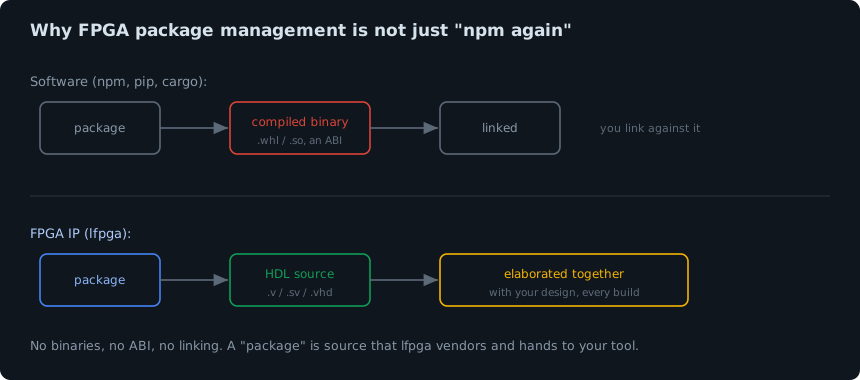
There is no binary and no linking. A Python wheel is a compiled artifact you link against. An FPGA core is HDL source that gets elaborated together with your design on every build. So lfpga fetches source and vendors it, it never produces a binary. And there is no universal build: Verilog and VHDL are consumed by a dozen tools, each with its own file-list format, so lfpga emits a plain filelist they all understand and can drive the open ones directly.
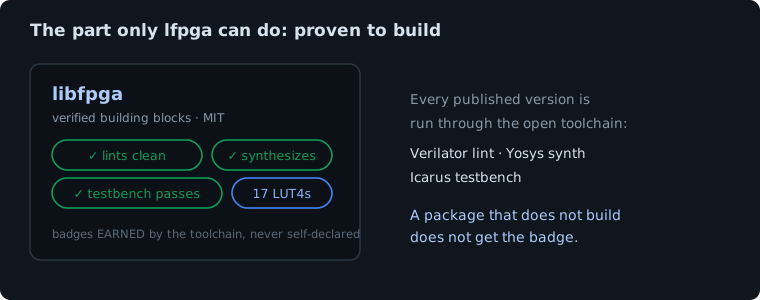
Every package can be proven to build
This is the part no other FPGA tool offers. Each listing in the
registry can be run through an open toolchain that lints
it with Verilator, synthesizes it with Yosys, and runs its testbench with
Icarus. A core that passes earns badges and real resource numbers, and those
badges are earned by the toolchain, never self-declared. So
lfpga add can tell you a dependency actually builds before you
clone a single line.
How it works
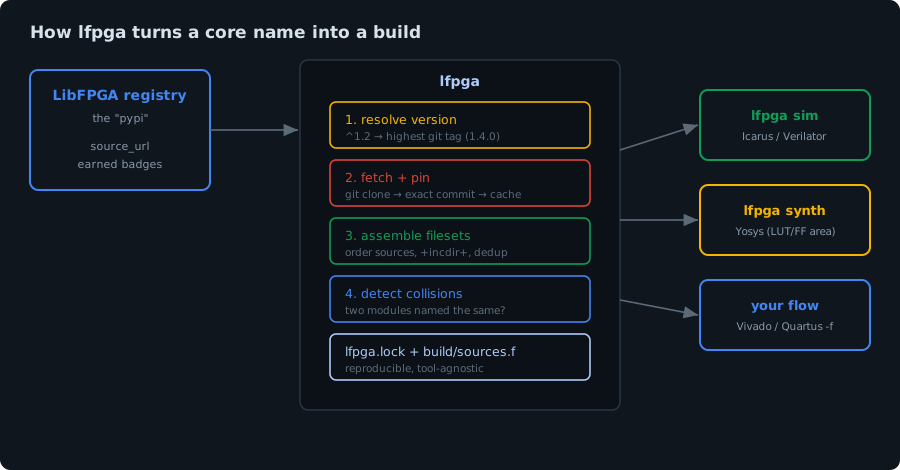
lfpga asks the registry for a core's source repository, resolves a version
range against that repo's git tags, fetches and pins the exact commit into a
local cache, and reads the repo's own manifest, both for its synthesizable
sources and for its own dependencies, which it pulls in
transitively. It de-duplicates cores shared across the graph, flags
version conflicts, is cycle-safe, checks for module-name collisions, and writes
a lockfile plus a build/sources.f filelist. From there it hands the
filelist to your flow or runs the build itself.
The commands, in detail
Add a core, badges and all
lfpga looks the core up in the registry and shows you what you are getting before it touches your disk.
$ lfpga add libfpga
Found libfpga: https://github.com/libfpga/libfpga
  license MIT · verilog · ✓ lint, synth, testbench, formal
Added 'libfpga' to libfpga.yaml. Run `lfpga install`.
Resolve versions against real git tags
Ask for a range and lfpga picks the highest matching tag the core actually
published. Carets, tildes, 1.x wildcards, comparators and exact
versions all work.
$ lfpga add serv@^1.2
$ lfpga install
  serv   1.4.0   7d9cde4e6c   18 files   unverified
^1.2 resolved to 1.4.0, the newest 1.x
tag on the SERV repo. If nothing matches you get a clear error listing the
available versions, not a mystery.
Install, and pin it in a lockfile
Because HDL builds are source-and-elaborate with no ABI, reproducibility is
lockfile-first. Commit lfpga.lock: it pins the exact commit and
the exact build sources, so a build is identical across machines and years.
# lfpga.lock
[[package]]
name = "libfpga"
version = "v0.5.0"
rev = "a4ef4a3fa4ac1de6aa485baf3efc56f14a6df704"
files = ["rtl/math/lfpga_crc.v"]
verified = ["formal", "lint", "synth", "testbench"]
Simulate and synthesize, do not just fetch
This is where lfpga becomes a build tool. Point it at a testbench and it runs the simulation with Icarus or Verilator. Synthesis is one command too, and it reports the area.
$ lfpga sim
TB PASS: CRC-16/CCITT check = 0x29b1
✓ simulation passed
$ lfpga synth
  17 LUT4s, 16 flip-flops
✓ synthesis succeeded (top: lfpga_crc)
For the proprietary flows, lfpga generates the build script from the same
resolved graph: lfpga sources --format vivado emits a Vivado Tcl
(read_verilog/read_vhdl plus the include dirs) and
--format quartus emits Quartus .qsf assignments. A
plain -f filelist and Verilator arg formats are there too.
$ lfpga sources --format vivado -o vivado.tcl
Wrote vivado.tcl
$ vivado -mode batch -source vivado.tcl
Catch collisions before they bite
Verilog has one global module namespace, so two cores that both define a
fifo will not elaborate together. lfpga scans the resolved
sources and tells you up front, instead of letting the build mis-compile.
! 1 module-name collision(s) (these will clash at elaboration):
    module 'fifo': acme-fifo (rtl/fifo.v), other-lib (src/fifo.v)
  Fix: pin different versions, modules-subselect, or drop one dependency.
Already using FuseSoC or Bender? Import it
lfpga import reads a FuseSoC .core or a
Bender.yml into your manifest, so an existing project adopts lfpga
in seconds.
$ lfpga import mycore.core
Imported 1 dependencies and 1 fileset(s) into libfpga.yaml.
The manifest
One file, libfpga.yaml, like Cargo.toml: it both declares your
dependencies and, if you publish, describes your own core.
# libfpga.yaml
name: my-soc
dependencies:
  libfpga: "*"                       # latest default branch
  picorv32: { rev: v1.0.3 }          # pin a tag, branch or commit
  libfpga-myhdl: { modules: [lfpga_mac] }   # sub-select from a repo
  private-mac: { git: "https://github.com/acme/mac.git" }
Command reference
lfpga init [name]            create a libfpga.yaml here
lfpga search <text>        search the registry for cores
lfpga info <name>          show a core's registry metadata
lfpga add <pkg>[@ver]       add a dependency (name, name@version, or a git URL)
lfpga install              resolve, pin (lfpga.lock), fetch, write build/sources.f
lfpga list                 show the locked dependencies and their badges
lfpga sources [--format]   emit a source list or a Vivado/Quartus build script
lfpga sim [--tool]          run a simulation (Icarus / Verilator)
lfpga synth                synthesize with Yosys and report area
lfpga import <file>         import a FuseSoC .core or Bender.yml
lfpga publish [repo]        list your core in the registry and queue verification
Publish your own core
Maintain an open FPGA core? One command lists it in the registry and queues it for the verification toolchain, then prints the badge for your README.
$ lfpga publish ✓ Listed as 'your-core' → libfpga.com/cores/your-core Queued for verification: lint, synth, testbench. Claim it to prove ownership: libfpga.com/cores/your-core/claim Add the badge to your README: [](https://libfpga.com/cores/your-core)
The badge reflects the earned status and links back to your core page, like this one from our own library:

Keep it fresh automatically with the GitHub Action, which re-lists your core on every push. No secrets required:
# .github/workflows/lfpga.yml
name: LibFPGA
on: { push: { branches: [main] } }
jobs:
  publish:
    runs-on: ubuntu-latest
    steps:
      - uses: libfpga/lfpga@v0.5.0
How to contribute
lfpga and the registry are open, and there are three easy ways to help:
- Publish or claim your core. Run
lfpga publishto list an open core, then claim it to prove ownership and edit its metadata. Badges are always earned by the toolchain, never self-declared. - Hack on the tool. lfpga is a small, readable Python package on GitHub. Issues and pull requests are very welcome, especially around new emitters and tool backends.
- Shape the roadmap. Edalize backends for the vendor flows (Vivado, Quartus) and transitive dependency resolution are next. Tell us what you need.